
This page is the central directory for every student in the university. It allows Registry staff to quickly look up student records, filter them by their current status, and view key academic metrics at a glance.
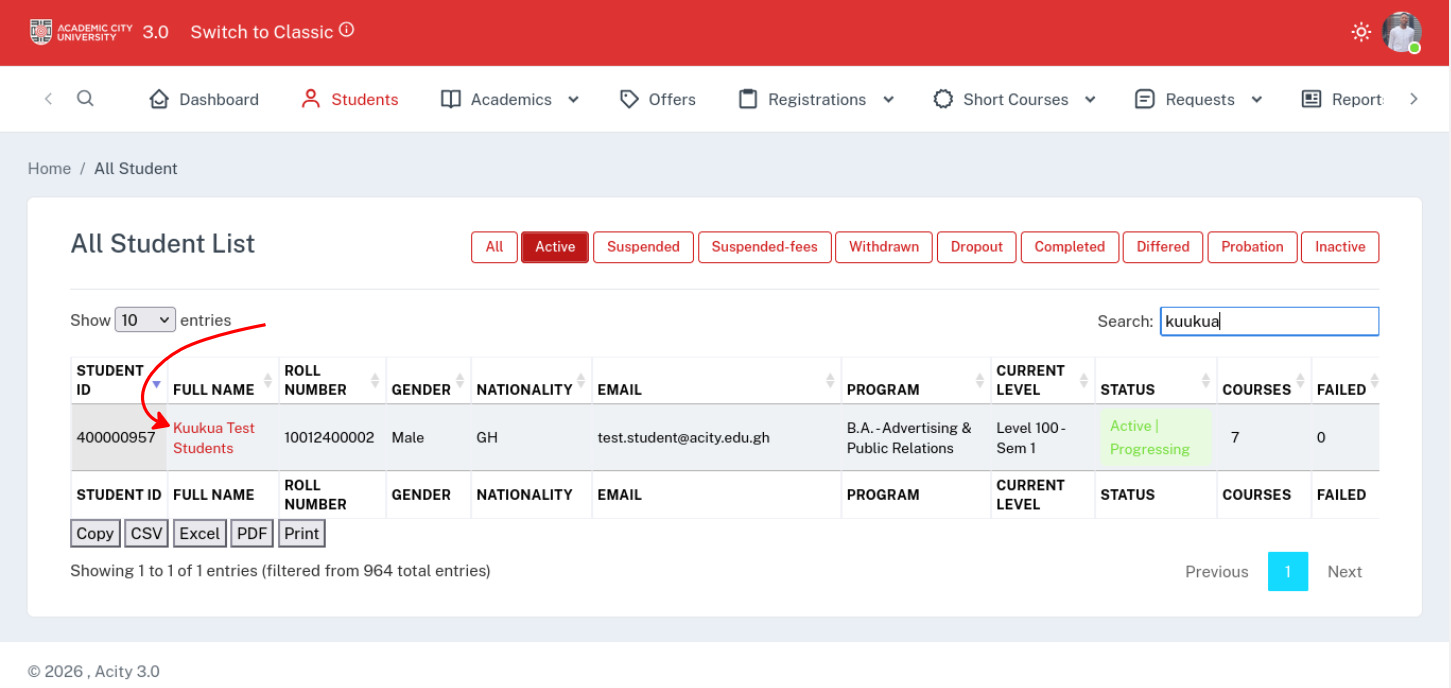
At the top of the list, you will see a row of clickable tabs. These are quick filters that allow you to sort the student list by their current academic or administrative status.
All: Displays every single student record in the system.
Active (Selected in Red): Shows only students who are currently enrolled and taking courses.
Suspended: Students temporarily barred from attending classes or taking exams due to disciplinary or academic reasons.
Suspended-fees: Students whose access is restricted specifically because of unpaid school fees.
Withdrawn: Students who have officially pulled out of the university.
Dropout: Students who stopped attending without an official withdrawal.
Completed: Students who have finished their program requirements (Alumni).
Differed: Students who have been granted a formal deferral (e.g., medical leave, personal reasons) and will return later.
Probation: Students whose academic performance is below the required standard and are under strict monitoring.
Inactive: Students currently not active for other various reasons.
Just below the filter tabs, you have tools to help you find specific students:
Show [10] entries: A dropdown menu that lets you choose how many student records appear on the screen at once (e.g., 10, 25, 50, 100).
Search: A text box where you can type a student’s name, ID, or email.
Example in image above: Typing "kuukua" instantly filters the list to show only that specific student.
The main body of the page is a table containing the most important information for each student. You can click on any column header (like "FULL NAME" or "STUDENT ID") to sort the table alphabetically or numerically.
Here is what each column means:
STUDENT ID: The unique system-generated ID number for the student (e.g., 400000957).
FULL NAME: The student's name. Note: The name will usually be in red, meaning you can click on it to open their full profile.
ROLL NUMBER: The official university registration/roll number.
GENDER: The student's gender (Male/Female).
NATIONALITY: The student's country of origin (e.g., GH for Ghana).
EMAIL: The student's official university email address.
PROGRAM: The specific degree or diploma they are studying (e.g., B.A.-Advertising & Public Relations).
CURRENT LEVEL: Their current academic standing (e.g., Level 100 - Sem 1).
STATUS: Their current standing in the system. In the screenshot, it says "Active | Progressing" highlighted in green, meaning they are in good standing and moving forward.
COURSES: The number of courses the student is currently registered for (e.g., 7).
FAILED: The number of courses the student has previously failed (e.g., 0).
Note: Clicking on the student name will open the student profile showing you information about the student.