The All Programs section acts as the master academic catalogue for the university. It allows you to view every degree and diploma offered, check how long the program takes, and drill down into the exact curriculum (the specific courses a student must take each semester).
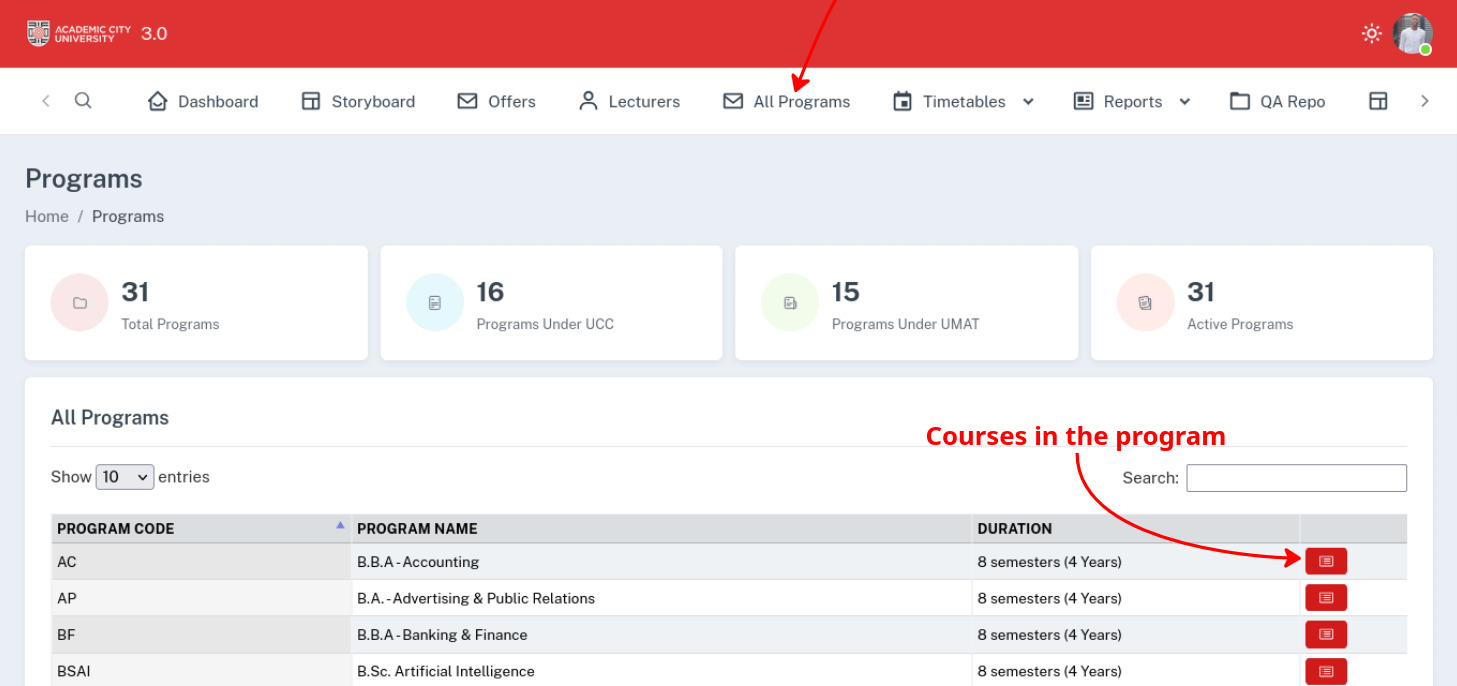
When you click All Programs in the top navigation menu, you are presented with a summary view of all academic offerings.
Summary Metric Cards
At the top, four cards give you a quick overview of the university's academic portfolio:
Total Programs (31): The total number of degree and diploma programs offered by the university.
Programs Under UCC (16): Programs that are affiliated with or mentored by the University of Cape Coast (UCC).
Programs Under UMAT (15): Programs that are affiliated with or mentored by the University of Mines and Technology (UMAT).
Active Programs (31): Programs that are currently accepting students and active in the system.
The Programs Table
Below the cards is the master list.
PROGRAM CODE: The short abbreviation used in the system (e.g., AC for Accounting, AP for Advertising).
PROGRAM NAME: The full title of the degree (e.g., B.B.A - Accounting).
DURATION: The standard length of the program (e.g., 8 se
On the far right of every row, there is a red icon (highlighted by your red arrow).
What it does: Clicking this button opens the complete curriculum for that specific program.
On the far right of every row, there is a red icon (highlighted by your red arrow).
What it does: Clicking this button opens the complete curriculum for that specific program.
On the far right of every row, there is a red icon (highlighted by your red arrow).
What it does: Clicking this button opens the complete curriculum for that specific program.
mesters (4 Years)).
Search & Show Entries: Just like other pages, you can search for a specific program or adjust how many rows are visible.
When you click the red button, you are taken to the curriculum breakdown for that specific degree
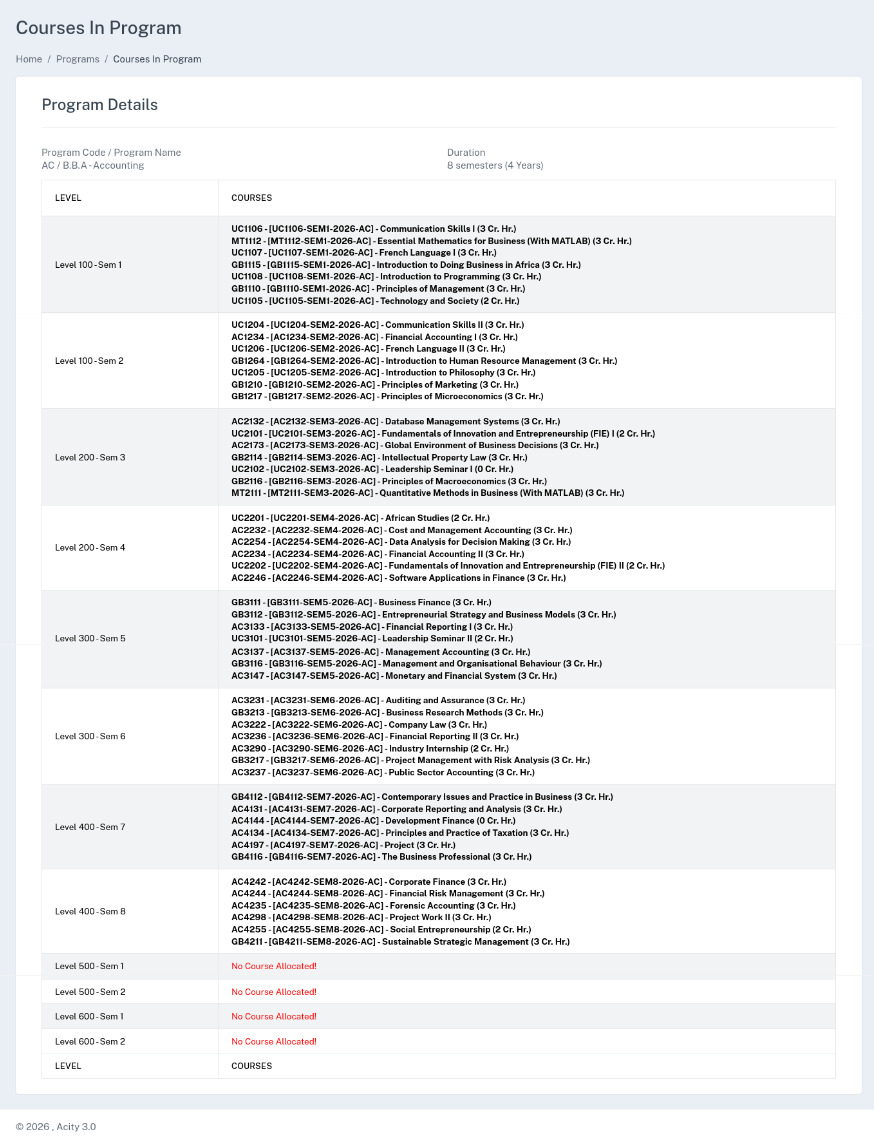
At the top, it confirms the Program Code/Name and the total Duration (8 semesters / 4 Years).
The Curriculum Breakdown Table
The main table is organized into two columns: LEVEL and COURSES.
LEVEL: The system breaks the program down semester by semester, starting from Level 100 - Sem 1 all the way through to Level 400 - Sem 8.
COURSES: Under each level, it lists the specific courses the student is required to take. It provides the Course Code, the Course Name, and the Credit Hours (e.g., UCI106 - [UCI106-SEM1-2026-AC] - Communication Skills I (3 Cr. Hr.)).
Why this is useful: If a student claims they are taking a specific course, or if Registry needs to verify if a student is taking the correct classes for their level, this is the definitive list to check.
"No Course Allocated!"
If you look at the bottom of the list for this 4-year program, you will see Levels 500 and 600. Under these levels, it says "No Course Allocated!" in red text.
What this means: Because this is a 4-year (8-semester) program, there are no classes scheduled for years 5 and 6. The system auto-generates these blank rows to show that the curriculum map ends at Level 400.
If you see this on a 5 or 6-year program: If a program should have courses for Level 500 or 600 but shows this red warning, it means the Academic department has not yet mapped those courses in the system, and it needs to be flagged for them to fix.